


October 9, 2026
✨ SMEs: Up to 50% EDGE Grant Support Available

Accurate inventory records are essential for businesses preparing their financial statements and year-end stock valuation. However, many businesses discover discrepancies between their ERP inventory balances and actual warehouse quantities during physical stock-taking. These differences can affect purchasing decisions, inventory valuation, financial reporting and overall operational efficiency.
In many cases, the problem is not simply inaccurate counting. Unposted goods receipts, stock movements in transit, incorrect units of measurement and delayed transactions can all contribute to inventory mismatches. As November approaches, businesses with December financial year-ends should review their inventory records and identify potential discrepancies before closing their accounts. This guide explains five common causes of stock differences and provides a practical year-end stock-taking checklist.
Looking for a system to manage these workflows? Explore Adaptive BizApp Inventory Management
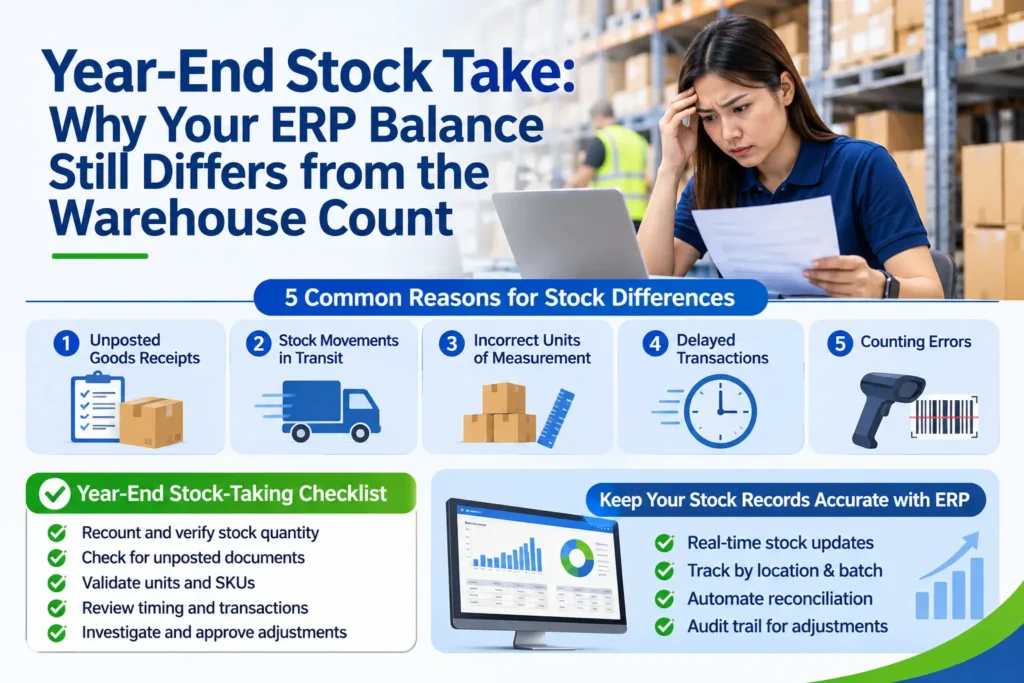
The golden rule: investigate first, adjust second. Posting a stock adjustment simply to match the system hides the root cause and guarantees the same error next year.
Work through variances in this order:
Only then raise a stock adjustment for the remaining genuine differences. Good control means the person who counts is not the same person who approves, adjustments above a threshold need a manager’s sign-off, and every adjustment keeps a clear audit trail: who requested it, who approved it, when, and why. For write-offs, review whether the cost should be recognised in the current year and whether any related stock needs a net realisable value assessment.
SMEs are eligible for up to 50% business grant support for the adoption of Adaptive Bizapp ERP, a Pre-Approved Solution under the IMDA SMEs Go Digital programme.
Reduce costs, improve efficiency, and accelerate your digital transformation with government-backed support.
A year-end stock take should confirm your records, not rescue them. This is where inventory management software in Singaporeearns its place, because most of the five causes above come from manual, disconnected processes.
Well-designed inventory and ERP software typically helps businesses to:
Software does not replace good process, but it makes good process far easier to enforce.
Adaptive BizApp is a business application platform built for Singapore SMEs and inventory-based businesses such as retailers and wholesalers. Its Inventory Management and ERPcapabilities are designed to bring stock, purchasing, sales and finance information together in one place, so your warehouse team and your accounts team work from the same figures rather than separate spreadsheets.
For businesses preparing for a year-end stock take, that joined-up approach can help you review stock records by item and location, trace transactions behind a variance, and keep stock-related information connected to your wider business operations. Because every business has different workflows, such as multiple warehouses, batch or serial tracking, or retail and wholesale channels, the best way to see how it fits is to walk through your own stock-taking process with the team. Specific features and configurations should be confirmed with Adaptive BizApp based on your requirements.
1. When should we do our year-end stock take?
Most businesses count on or as close as possible to their financial year-end date, then roll the count forward or back to the exact balance sheet date using documented movements. Whatever date you choose, apply a strict cut-off so every receipt and issue lands in the right period. If your auditors plan to attend the count, agree the date with them in advance.
2. How long should a stock take take?
It depends on SKU count, warehouse layout and team size. A small retailer may finish in a day, while a multi-location wholesaler may need several days. Preparation shortens the count more than extra manpower does. Businesses that run regular cycle counts typically find year-end counts faster because records are already close to accurate.
3. What is an acceptable stock variance?
There is no universal figure. Many businesses set tolerance by value and item class, for example tighter limits for high-value A-items and looser ones for low-value fasteners or packaging. What matters is that thresholds are defined in advance, applied consistently and approved by management.
4. Should we adjust the ERP to match the physical count straight away?
No. Investigate first. Many variances are caused by unposted or late transactions that, once entered, will correct the balance without any adjustment. Adjusting too early can create a double correction and hide process faults. Post a stock adjustment only for genuine, explained differences, with approval and a reason code.
Manage finance,HRMS, inventory, sales & operations in one powerful platform to improve efficiency and accelerate business growth.
Latest Posts


Categories
Tags
Follow Us
Platform
Solutions
Company & Grants
Built for modern businesses with smart, scalable solutions that simplify operations and boost team efficiency.
Contact Info
Email Us
info@adaptivebizapp.com
Awards and Certifications




© 2026 Adaptive Cloud Systems Pte. Ltd. All Rights Reserved.
Built to support modern businesses with smart, scalable solutions. We simplify daily operations and enable teams to work faster, smarter, and more efficiently.
© 2026 Adaptive Cloud Systems Pte. Ltd. All Rights Reserved.