

Reduce hours of manual accounting work with Adaptive Bizapp Bank Reconciliation Software. Upload your bank statement and let AI analyse transactions, identify matching accounting entries, suggest matches and help create missing transactions — giving your finance team a faster way to complete bank reconciliation.
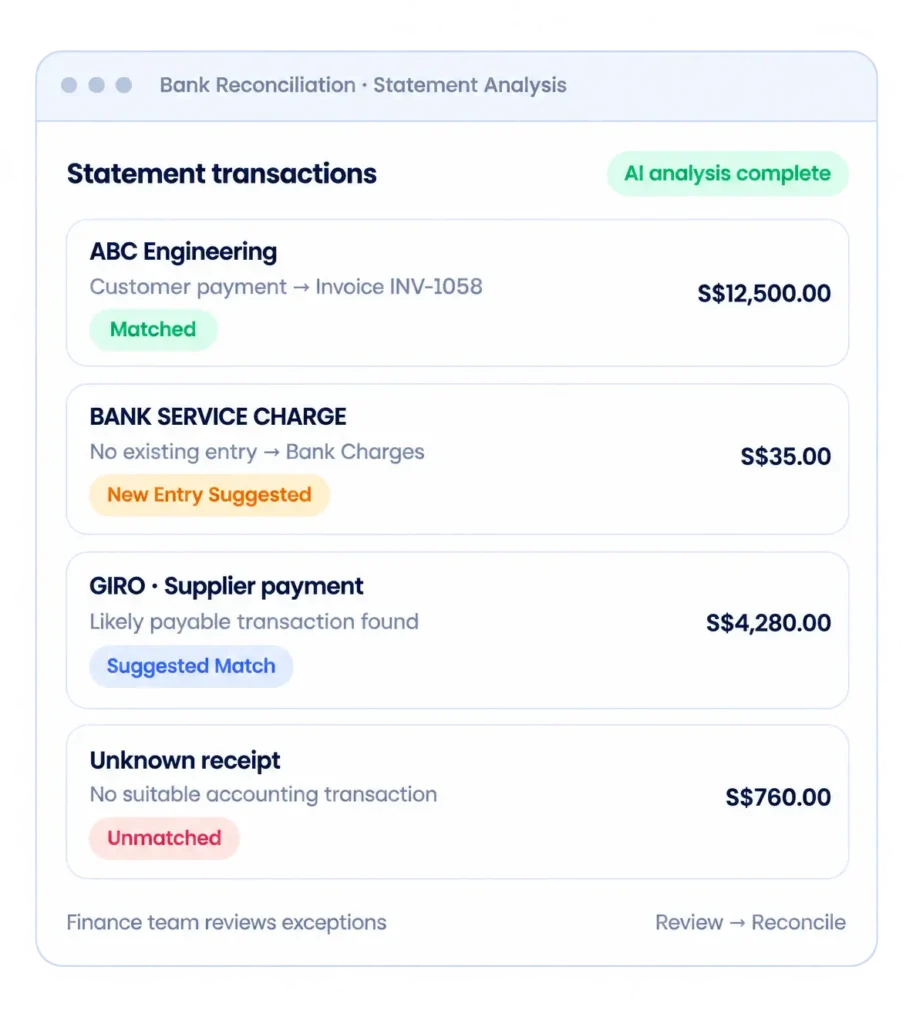
Traditional bank reconciliation requires finance teams to compare bank statement transactions against accounting records manually. With hundreds or thousands of transactions, this can become repetitive and time-consuming.
Adaptive Bizapp introduces AI-powered bank reconciliation automation to simplify the process. Instead of checking every transaction manually, your team can focus primarily on exceptions.
The system helps your finance team:
Upload bank statements
Extract bank transactions
Compare transactions against accounting entries
Automatically identify likely matches
Detect unmatched transactions
Suggest corresponding entries
Create new accounting entries where required
Highlight exceptions for review
Confirm and complete reconciliation
Three stages take you from a raw bank statement to suggested matches.
01
Upload Your Bank Statement
Start by uploading your bank statement into Adaptive Bizapp. The system reads the transaction information required for reconciliation. The imported transactions are prepared for comparison against your accounting records.
02
AI Analyses Every Bank Transaction
Adaptive Bizapp analyses the imported bank transactions and compares them against transactions already available within your accounting system. Instead of depending only on an exact description, the process can use multiple transaction attributes to identify potential matches. This helps reduce the effort required to manually search through invoices, receipts, payments and accounting entries.
03
Automatically Match Existing Transactions
When a corresponding accounting transaction is identified, Adaptive Bizapp can suggest the transaction as a match. Finance users can review the suggestion before completing the reconciliation.
The biggest challenge in bank reconciliation is often identifying which bank transaction belongs to which accounting transaction. Adaptive Bizapp helps automate bank transaction matching.
The system can compare available information such as:
Amount
Transaction Date
Customer or Supplier
Reference Number
Invoice or Payment Reference
Transaction Description
Existing Accounting Records
Potential matches are presented to the finance user for verification. This significantly reduces manual searching when reconciling large numbers of transactions.
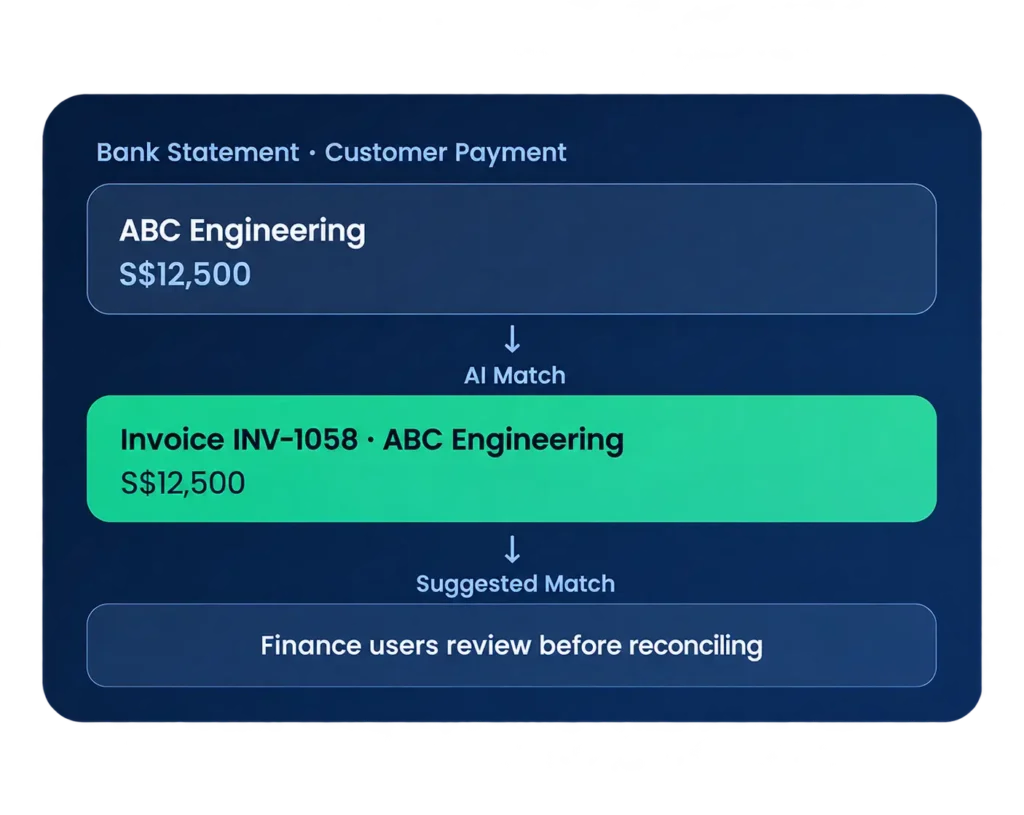
Not every transaction appearing in a bank statement will already exist in your accounting system. This is where AI-assisted reconciliation becomes particularly useful. Adaptive Bizapp can identify an unmatched bank transaction and help the user create the required accounting entry.
Automatically Identify Common Bank Transactions
Bank statements frequently contain recurring transactions that finance teams otherwise need to enter manually. Users can review the suggested accounting treatment before accepting it.
Bank charges
Bank interest
GIRO payments
Customer receipts
Supplier payments
Recurring expenses
Transfers between accounts
Other common bank transactions

Bank statement descriptions do not always match the information stored in an ERP.
A customer name may be shortened.
A supplier reference may appear differently.
An invoice number may be included inside a longer bank description.
Adaptive Bizapp uses intelligent matching to help identify potential relationships between bank transactions and accounting records. This makes reconciliation more flexible than relying entirely on exact text matching.

AI automation should reduce accounting work without removing financial control. Adaptive Bizapp keeps finance users involved in the reconciliation process. Your finance team reviews the results and determines the appropriate action.
Matched
A corresponding accounting transaction has been identified.
Suggested Match
The system has identified a likely matching transaction for review.
Unmatched
No suitable accounting transaction has been identified.
New Entry Suggested
A corresponding accounting entry may need to be created.
Instead of hiding discrepancies inside spreadsheets, Adaptive Bizapp keeps unmatched transactions visible. Finance users can quickly identify transactions requiring attention. This provides a clearer exception-based workflow for your finance team.
Missing accounting entries
Incorrect transaction amounts
Different transaction dates
Duplicate transactions
Bank charges
Interest income
Unknown receipts
Unrecorded payments
Timing differences
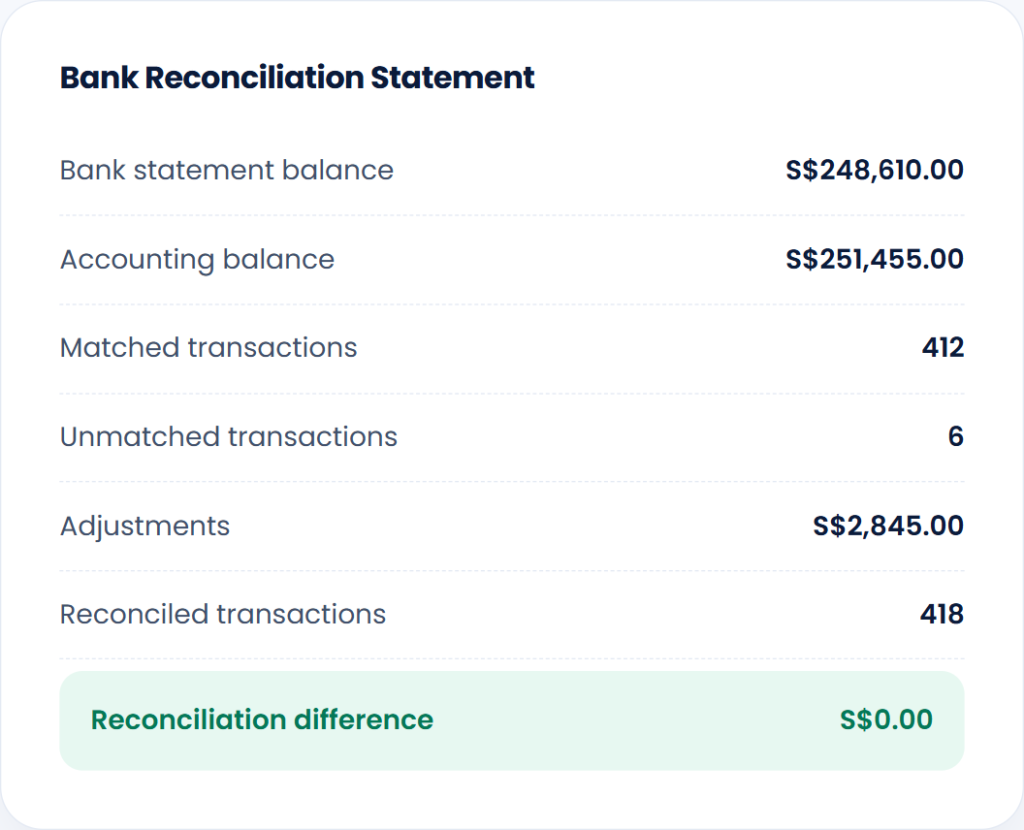
Maintain a clear bank reconciliation statement showing how accounting records match bank activity, providing finance teams with a structured reconciliation record.
Transform time-consuming spreadsheet matching into intelligent, automated financial reconciliation with Adaptive BizApp.
Traditional Process
Adaptive Bizapp
Reduce repetitive accounting work while keeping your finance team in control.
Businesses often operate more than one bank account. Adaptive Bizapp allows bank reconciliation records to be managed separately across your business accounts, helping finance teams maintain clearer records when working with multiple banks or accounts.
Track reconciliation status by:
Company
Bank
Bank account
Currency
Statement period
Reconciliation period
This makes the solution suitable for businesses with more complex accounting operations.
Keep a Clear Reconciliation History
Maintain historical reconciliation information within the system instead of depending on individual spreadsheets.
Your finance team can review previous reconciliation periods, matched transactions, adjustments and unresolved items. This provides better traceability for internal review and accounting operations.
Manual reconciliation becomes increasingly difficult as transaction volumes increase.
Save Finance Team Time
Reduce repetitive comparison between bank statements and accounting records.
Reduce Manual Data Entry
Create or suggest accounting entries from unmatched bank transactions.
Find Matches Faster
Let the system identify potential matches instead of searching transactions one by one.
Identify Exceptions
Focus your finance team's attention on transactions that actually require investigation.
Improve Accounting Accuracy
Reduce mistakes caused by repetitive manual entry and transaction matching.
Keep Records Organised
Maintain reconciliation history within your ERP instead of separate spreadsheets.
Bank reconciliation becomes more powerful when it is connected directly to your accounting and operational data. Adaptive Bizapp can reconcile bank transactions against records generated throughout the ERP.
Accounts Receivable
Match customer receipts against outstanding invoices.
Accounts Payable
Match supplier payments against payable transactions.
Sales
Connect incoming customer payments with sales invoices.
Purchases
Connect outgoing payments with supplier transactions.
Accounting
Create and maintain the accounting entries required for reconciliation.
Projects
Keep financial transactions connected with the wider project and accounting environment.
Adaptive Bizapp AI Bank Reconciliation is designed for businesses that want to reduce repetitive finance operations while maintaining visibility and control.
Whether you process dozens or thousands of transactions, automated reconciliation can reduce the amount of repetitive work required from your finance team.
Suitable for:
SMEs
Construction companies
Engineering businesses
Distribution companies
Project-based businesses
Wholesale businesses
Service companies
Finance and accounting teams
Learn how AI-powered bank reconciliation simplifies transaction matching, reduces manual errors, and improves financial accuracy for Singapore businesses.
Bank reconciliation is the process of comparing transactions recorded in your accounting system with transactions appearing on your bank statement. Differences are identified and investigated so that the accounting records can be reconciled with bank activity.
Yes. Adaptive Bizapp uses automation and AI-assisted matching to compare imported bank transactions with existing accounting records, suggest matches and identify transactions requiring review.
Upload a bank statement and Adaptive Bizapp analyses the transactions against your accounting data. It identifies likely matches, highlights unmatched transactions and can assist with creating missing accounting entries.
Yes. Adaptive Bizapp can compare bank transactions with accounting records and suggest potential matches based on available transaction information.
The transaction is identified as unmatched. Where appropriate, the system can help suggest or create the accounting entry required before reconciliation.
The system can help identify common unmatched transactions such as bank charges, interest and recurring transactions and assist the finance user with creating the appropriate entry.
Yes. Incoming bank transactions can be compared against outstanding customer invoices and payment information to identify potential matches.
Yes. Outgoing bank transactions can be compared with supplier and payable records to identify corresponding transactions.
No. AI-assisted reconciliation is designed to automate transaction analysis and matching while allowing finance users to review suggested actions before completing reconciliation.
Yes. Reconciliation can be managed across multiple bank accounts according to your company’s accounting setup.
Your finance team should not have to spend hours comparing bank statements with accounting transactions line by line.
Upload → Auto Match → Auto Create → Review → Reconcile
Bring AI-assisted automation into your accounting workflow and spend more time reviewing exceptions instead of processing repetitive transactions.
Built to support modern businesses with smart, scalable solutions. We simplify daily operations and enable teams to work faster, smarter, and more efficiently.
© 2026 Adaptive Cloud Systems Pte. Ltd. All Rights Reserved.