

October 9, 2026
✨ SMEs: Up to 50% EDGE Grant Support Available

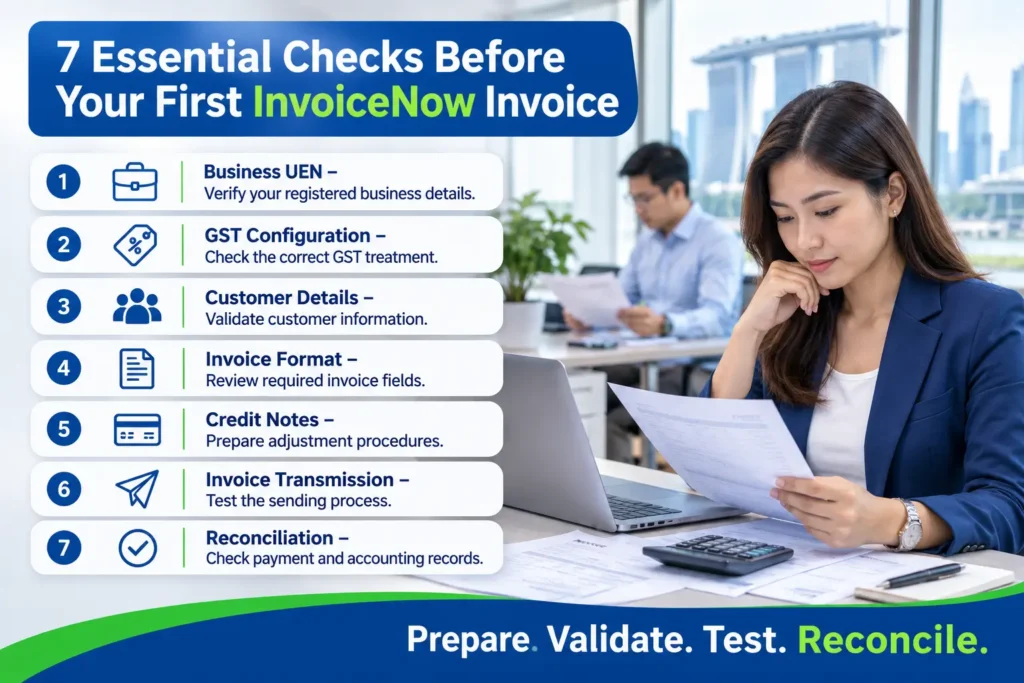
Singapore businesses preparing to adopt InvoiceNow need more than an electronic invoicing connection. Their ERP systems must also maintain accurate customer information, GST configurations, invoice records and accounting workflows to ensure transactions are processed correctly. A small configuration error, such as an incorrect customer UEN or tax code, can result in rejected invoices, reconciliation issues and unnecessary administrative work.
Before sending the first live invoice, businesses should review how their ERP handles invoice creation, transmission, credit notes and financial reconciliation. This guide explores seven essential ERP checks that Singapore businesses should complete before going live with InvoiceNow, helping finance teams establish a more reliable invoicing process.
Looking for a system to manage these workflows? Explore Adaptive BizApp ERP Software
InvoiceNow is Singapore’s national e-invoicing network, built on the Peppol framework and led by IMDA Instead of emailing a PDF that someone must retype, your accounting or ERP system sends a structured, machine-readable invoice to your customer’s system through an accredited access point. The receiving system can read the data directly, which cuts re-keying and reduces disputes over what was billed.
It helps to separate two ideas that are often mixed up:
As announced by IRAS and the Government, the GST InvoiceNow requirement already applies to new voluntary GST registrants, and is being extended in phases: new compulsory registrants from April 2028, and existing GST-registered businesses progressively between 2028 and 2031, based on annual supplies, with all GST-registered businesses in scope by April 2031. Dates and thresholds can be refined, so confirm your own phase on the IRAS website or with your tax adviser. Even if your date is a few years away, the electronic invoicing Singapore ecosystem is moving in one direction, and clean ERP data is the cheapest preparation you can make.
1. Verify Customer and Supplier UEN Details
In InvoiceNow, a party is identified by its registration details, and for most Singapore entities that means the UEN. A typo, a missing character or an old UEN carried over from a legacy spreadsheet can cause delivery to fail or route to the wrong place.
Export your customer and supplier master data and check each active record:
Clean this up first. It is tedious, but every later check depends on it.
2. Review GST Registration and Tax Codes
GST InvoiceNow is only as reliable as your tax coding. Confirm your own GST registration number is stored correctly, then review every tax code in the ERP.
A tax code that looked harmless in a PDF invoice can become a visible data error once it is transmitted in a structured format.
3. Check Invoice Numbering and Customer Information
4. Test Credit Notes and Adjustment Documents
Most teams test the happy path and forget corrections. Yet credit notes, debit notes and revised invoices are where reconciliation problems usually begin.
Test at least these scenarios:
In each case, confirm the document references the original invoice, carries the correct GST treatment, and posts the expected entries to receivables and the GST account.
5. Run Test Transactions Before Going Live
Never make your first transmission a real customer invoice. Use a test environment or a friendly trading partner and run a realistic batch: different customers, currencies, tax codes, discounts, long descriptions and attachments.
Have someone outside the finance team review what was sent, and confirm the receiving side can read it. Record what you tested and who signed it off. A short test log is useful evidence if an auditor or your accountant asks how you validated the setup.
6. Understand Transmission Failures and Error Handling
Some invoices will fail. The question is whether you notice. Before go-live, agree on how your team will answer these questions:
Assign an owner for this daily or weekly review. An error queue that nobody watches is a compliance risk in disguise.
7. Reconcile Transmitted Invoices with ERP Accounting Records
The last check is the one that turns InvoiceNow compliance into routine. Each period, compare what was transmitted against what the ledger says: invoice counts, totals, GST amounts and credit notes.
Make this part of month-end alongside bank and GST reconciliations. Any invoice that exists in the ERP but not in the transmission log, or the other way round, should be investigated immediately. Reconciling monthly is far easier than untangling six months of differences when you prepare your GST return.
SMEs are eligible for up to 50% business grant support for the adoption of Adaptive Bizapp ERP, a Pre-Approved Solution under the IMDA SMEs Go Digital programme.
Reduce costs, improve efficiency, and accelerate your digital transformation with government-backed support.
A few patterns come up repeatedly:
Use this as a starting point and adapt it to your business:
Invoicing rarely fails in isolation. It fails when customer data lives in one place, tax rules in another and payments in a third. A well-configured ERP keeps these connected, so the invoice is generated from the same master data that drives your ledger.
Good ERP invoicing software helps in practical ways:
This is the real benefit of InvoiceNow ERP integration: not just sending a document, but making sure the data behind it is accurate, traceable and reconciled.
Adaptive BizApp is an ERP solution designed to help Singapore SMEs manage business and financial workflows in one place. Its Invoicing module supports creating and managing customer invoices, while Accounting keeps receivables, payables and the general ledger aligned with the invoices you issue.
A note on InvoiceNow specifically: if you plan to transmit invoices through InvoiceNow, confirm with the Adaptive BizApp team how your requirements would be met, including any access point or accredited provider arrangements, before you commit to a go-live date. Whichever system you use, the seven checks above still apply, because clean data and disciplined processes are what make e-invoicing work.
1. Is InvoiceNow mandatory for all Singapore SMEs?
InvoiceNow is voluntary for general use, but the GST InvoiceNow Requirement is mandatory for GST-registered businesses in phases. New voluntary GST registrants are already covered, and existing registrants are being brought in progressively between 2028 and 2031. Check your phase with IRAS.
2. How is InvoiceNow different from emailing a PDF invoice?
A PDF is a picture of an invoice that someone must read and retype. InvoiceNow sends structured data that the receiving system can process directly, which reduces manual entry and errors.
3. Do I need a Peppol ID or an access point to use InvoiceNow?
Generally, yes. Businesses connect through an IMDA-accredited access point or a software provider that offers this service, and register in the Peppol network. Ask your provider what they handle and what you must do yourself.
4. What happens if an InvoiceNow invoice fails to transmit?
The invoice should be investigated, corrected and resent without creating a duplicate record. Define who monitors failures, how quickly they are cleared and how corrections are documented in your ERP.
5. How do I choose an ERP for InvoiceNow compliance?
Look beyond the brochure. Ask how the system handles UEN and GST data, credit notes, error reporting, audit trails and reconciliation, and ask directly how InvoiceNow connectivity is provided and who supports it. Request a demonstration using your own sample transactions.
Manage finance,HRMS, inventory, sales & operations in one powerful platform to improve efficiency and accelerate business growth.
Latest Posts


Categories
Tags
Follow Us
Bring your teams, processes, and business data together with one integrated platform built to help Singapore businesses work smarter, improve efficiency, and grow with confidence.

Platform
Solutions
Company & Grants
Built for modern businesses with smart, scalable solutions that simplify operations and boost team efficiency.
Contact Info
Email Us
info@adaptivebizapp.com
Awards and Certifications



© 2026 Adaptive Cloud Systems Pte. Ltd. All Rights Reserved.
Built to support modern businesses with smart, scalable solutions. We simplify daily operations and enable teams to work faster, smarter, and more efficiently.
© 2026 Adaptive Cloud Systems Pte. Ltd. All Rights Reserved.