
🎉 Celebrating 14 Years of Adaptive Bizapp! Get 1 Year FREE Subscription! Limited-time offer valid until September 30, 2026.
Terms and conditions apply*

ERP for Small Businesses in Singapore: Benefits, Costs & Key Features

At some point, most growing small businesses hit the same wall: sales are tracked in one spreadsheet, stock in another, invoices in a separate accounting tool, and nobody has a single, current view of what’s actually going on. That’s usually the point business owners start asking whether an ERP system is worth the investment — and whether it’s overkill for a business their size.

This guide walks through what ERP software actually is, when it makes sense for a small business (and when it might not), what it typically costs, and how to approach choosing and implementing one without overcomplicating things.

What Is ERP Software?

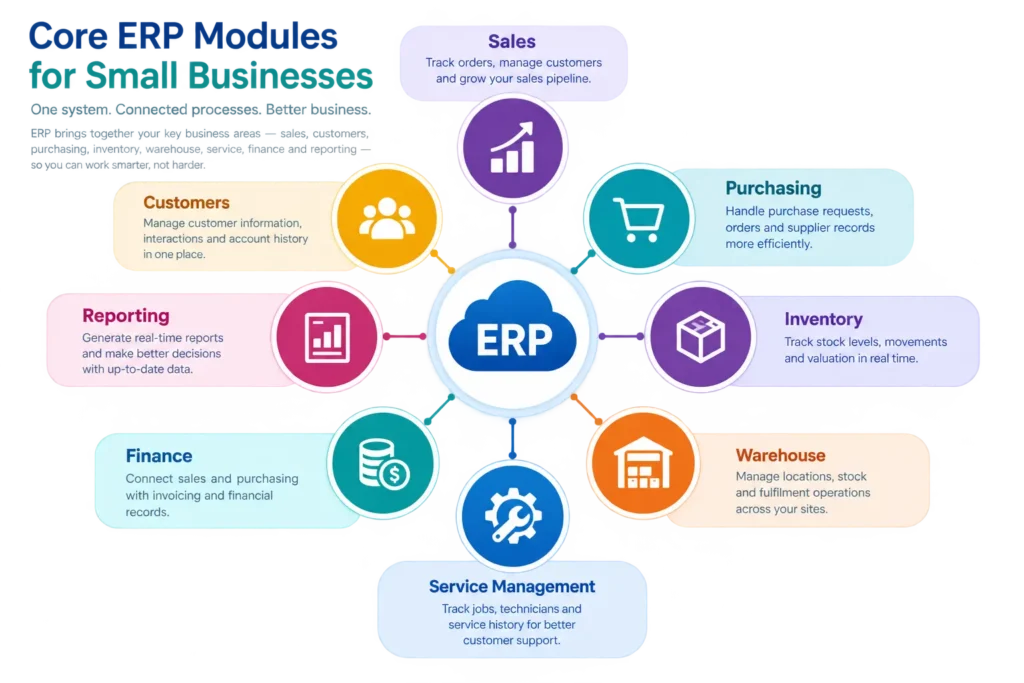
ERP (Enterprise Resource Planning) software is a system that brings together different core business processes — such as sales, purchasing, inventory, finance, and service operations — into one connected platform, rather than managing each area separately through disconnected tools or spreadsheets.

Instead of a sales order living in one spreadsheet, stock levels in another, and an invoice created manually in a third tool, ERP software links these processes together. A sales order can draw from the same inventory records used for purchasing, and that same transaction can flow through to invoicing — all within one system, rather than requiring someone to manually reconcile the numbers across separate places.

Collaborative ERP Team in Singapore

Does a Small Business Really Need ERP?

Not necessarily — and it’s worth being honest about that upfront. ERP tends to be most useful when a business has reached a point where:

  • Multiple processes need to work together. If sales, inventory, and finance are all interconnected in daily operations, keeping them in separate tools creates real friction.
  • Manual coordination is becoming a bottleneck. If staff are regularly cross-checking numbers between spreadsheets, or purchasing decisions are being made without accurate stock visibility, that’s a sign disconnected systems are costing real time.
  • The business is growing in complexity. More products, more locations, more staff, or more transaction volume all make manual processes progressively harder to manage.
  • Management lacks a clear, current view of the business. If getting an accurate sales or stock picture requires someone to manually compile numbers from multiple sources, that delay has a real operational cost.

On the other hand, a very small business with simple, low-volume operations — a single owner-operator, for instance, with a handful of transactions a week — may find a combination of simpler tools (a basic accounting package, a straightforward inventory app) perfectly adequate. ERP isn’t inherently “better” for every business; it’s a better fit once complexity and coordination needs reach a certain point. The right choice depends on your specific processes, budget, and growth plans, not a general rule that every small business needs one.

Benefits of ERP for Small Businesses

For businesses where ERP is a good fit, the benefits typically show up in these areas:

  • Centralised business information — customer, product, and transaction data held in one system rather than scattered across separate tools.
  • Better operational visibility — a clearer, more current picture of what’s happening across sales, inventory, and finance.
  • Reduced duplicate data entry — information entered once flows through connected processes, rather than being re-typed into multiple systems.
  • Improved coordination — sales, purchasing, and warehouse teams working from the same data, reducing the chance of conflicting information.
  • Inventory control — clearer visibility of stock levels, movements, and valuation across one or more locations.
  • Sales management — a structured way to track orders, customers, and the sales pipeline in one place.
  • Purchasing — centralised supplier records and a clearer view of the procurement process from request to delivery.
  • Finance visibility — sales and purchasing transactions connecting through to invoicing and financial records, reducing manual reconciliation.
  • Service management — for businesses with field or on-site work, a structured way to track jobs, technicians, and service history.
  • Reporting — the ability to generate reports from centralised, up-to-date data rather than manually compiling numbers from separate sources each time.

These are genuine, achievable benefits — but they depend on proper implementation and consistent use. ERP software organises and connects your data; it doesn’t automatically fix underlying process or data-quality issues on its own.

Key ERP Features for Small Businesses

When evaluating ERP options, small businesses typically look for:

  • Sales management — order tracking, customer records, and a clear sales pipeline.
  • Purchase management — purchase requests, purchase orders, and supplier records.
  • Inventory — stock tracking, ideally in real time, across one or more storage locations.
  • Warehouse management — support for organising stock storage, movement, and picking.
  • Customer management — a centralised database of customer information and interaction history.
  • Service management — for businesses managing on-site or field work, tools to schedule jobs, assign staff, and track service records.
  • Finance/accounting connectivity — sales and purchasing transactions connecting through to invoicing and financial records.
  • Reporting — dashboards and reports drawing from centralised, connected data.
  • User access — role-based permissions so staff see and act on only what’s relevant to their role.
  • Mobile/cloud access, where applicable — the ability to access the system from outside the office, useful for field staff or business owners on the move.

Adaptive BizApp’s own platform, for example, verifiably includes Customer & Sales Management for tracking leads, customers, and sales activity with configurable reporting; Vendor & Purchase Management covering centralised supplier records, procurement tracking from request to delivery, and configurable approval workflows; Inventory & Warehouse Management supporting multi-location stock tracking, SKU/barcode management, and batch/expiry tracking; Service Management (FSM) for job scheduling, technician assignment, and service tracking; and ASR+ Invoicing & Accounting, which is listed on IRAS’s Accounting Software Register+ and supports Peppol-based e-invoicing through InvoiceNow. Beyond these verified capabilities, we’d recommend confirming specific feature details directly with the team or in a demo, since functionality can be configured or updated over time.
Cloud ERP vs Traditional ERP

Factor

Cloud ERP

Traditional (On-Premise) ERP

Deployment

Hosted by the vendor; accessed via the internet

Installed and run on the business’s own servers

Accessibility

Accessible from anywhere with an internet connection, often including mobile

Typically limited to on-site or VPN-connected access

Maintenance

Generally handled by the vendor as part of the subscription

Usually requires in-house or contracted IT support

Scalability

Often easier to add users or modules as the business grows

May require additional hardware or infrastructure investment to scale

Upgrades

Usually rolled out by the vendor, often with minimal disruption

Typically require manual updates, which can be more disruptive

Infrastructure requirements

Minimal — mainly requires internet access and devices

Requires the business to own and maintain server infrastructure

How to Choose ERP for a Small Business

A practical checklist:

  1. Does it cover the processes that matter most to you? Prioritise the modules addressing your biggest current pain points, rather than the most feature-rich option overall.
  2. Is it genuinely usable by your team? A powerful system that’s too complex for daily staff to use consistently will undermine data accuracy rather than improve it.
  3. Does it scale with your business? Consider whether it can handle growth in users, transaction volume, or additional locations without a major overhaul.
  4. What’s the implementation and onboarding process like? Ask specifically how existing data gets migrated and how long a realistic go-live timeline looks.
  5. Is pricing transparent and does it map to your actual usage? Understand exactly what’s included at each pricing tier, and what triggers additional cost.
  6. Does it integrate with tools you’re already using, such as existing accounting software or e-commerce platforms?
  7. Is local support available? For SMEs without in-house IT resources, responsive local support can matter more than an extensive global feature set.
  8. Are relevant grants available? Check whether the solution is a pre-approved vendor under schemes like PSG, which could reduce your effective cost.

Frequently Asked Questions (FAQs)

  1. Is ERP too expensive for a small business? Not necessarily. Cloud ERP allows SMEs to choose the modules and users they need, while eligible businesses may also benefit from grants such as PSG.
  2. What’s the difference between ERP and accounting software?Accounting software focuses mainly on financial tasks, while ERP connects finance with sales, purchasing, inventory, and other business processes.
  3. Can a small business start with just one ERP module? Yes. SMEs can start with a key module, such as inventory or sales management, and add more as their business grows.
  4. Do I need IT staff to run an ERP system? Usually not for cloud ERP, as the vendor typically manages hosting, maintenance, updates, and infrastructure.

Conclusion

ERP isn’t a universal requirement for every small business — but for businesses where sales, inventory, purchasing, and finance are increasingly interconnected, and where manual coordination between separate tools is becoming a genuine bottleneck, it can meaningfully improve visibility, consistency, and operational control. The right decision depends on your specific processes, growth trajectory, and budget, not a blanket assumption that bigger is always better.

If you’re weighing whether ERP makes sense for your business, it’s worth starting with a clear picture of your actual pain points rather than jumping straight to a full-scale implementation. Adaptive BizApp’s ERP platform is built specifically for Singapore SMEs, with modules covering sales, purchasing, inventory and warehouse management, and service operations that can be adopted individually or as a connected suite.

Book a free demo to talk through what would actually fit your business.

Learn More

Smart ERP. Smarter Business.

Manage finance,HRMS, inventory, sales & operations in one powerful platform to improve efficiency and accelerate business growth.

Latest Posts

  • All Posts
  • Accounting Management
  • Customer and sales management
  • e-PTW
  • ERP
  • Field Service Management
  • Inventory Management
  • Vendor and Purchase Management
  • Warehouse Management

Categories

Follow Us

Built to support modern businesses with smart, scalable solutions. We simplify daily operations and enable teams to work faster, smarter, and more efficiently.

Contact Info

© 2026 Adaptive Cloud Systems Pte. Ltd. All Rights Reserved.