FSM Software for Singapore Businesses: How Field Service Management Improves Operations
If your team is still juggling job schedules on Excel and chasing technician updates over WhatsApp, you already know the pain points: double bookings, jobs that fall through the cracks, and a manager who’s the only one who actually knows what’s happening in the field on any given day.
This article looks at what field service management (FSM) software actually does, the operational problems it’s built to solve, and what Singapore service businesses should look for before choosing a system.
What Is Field Service Management Software?
Field service management (FSM) software is a system that helps businesses coordinate technicians, service requests, and job activities that happen outside the office — covering scheduling, technician assignment, job tracking, and reporting in one platform. Rather than managing field operations through spreadsheets, phone calls, and messaging apps, FSM software centralises this information so managers, technicians, and customers all have visibility into the same job data.
For businesses that send technicians or field staff to customer sites — maintenance, cleaning, installation, repair, or facility services, among others — FSM software essentially replaces a patchwork of manual coordination tools with a single system built specifically for managing distributed, on-the-ground work.
Why Singapore Businesses Need Better Field Service Management
Service businesses running field operations manually tend to run into the same set of problems, regardless of industry:
- Manual service scheduling. Assigning jobs via spreadsheet or phone call works fine with a handful of technicians, but becomes error-prone and time-consuming as job volume grows — double bookings and missed appointments become more common.
- Technician coordination. Without a central system, managers often don’t know who’s available, who’s already overloaded, or who’s closest to a new job request.
- Delayed updates. If a technician can only report job status back at the office, managers and customers are left waiting for information that should be available in real time.
- Poor visibility into field activities. It’s difficult to answer basic questions — how many jobs were completed today, which are overdue, which technician handled a specific site — without someone manually compiling that information.
- Paper-based service records. Job sheets, service notes, and customer signatures on paper are easy to lose, hard to search, and slow to turn into reports or invoices.
- Communication gaps. Important details shared over a phone call or a WhatsApp message can get lost, forgotten, or never reach the right person, particularly across shift changes.
- Difficulty tracking job status. Without a shared system, “is this job done yet?” often requires a phone call rather than a quick check.
- Customer follow-up issues. Following up after a service visit, or answering a customer’s question about job status, is harder when the relevant details are scattered across paper notes and personal phones.
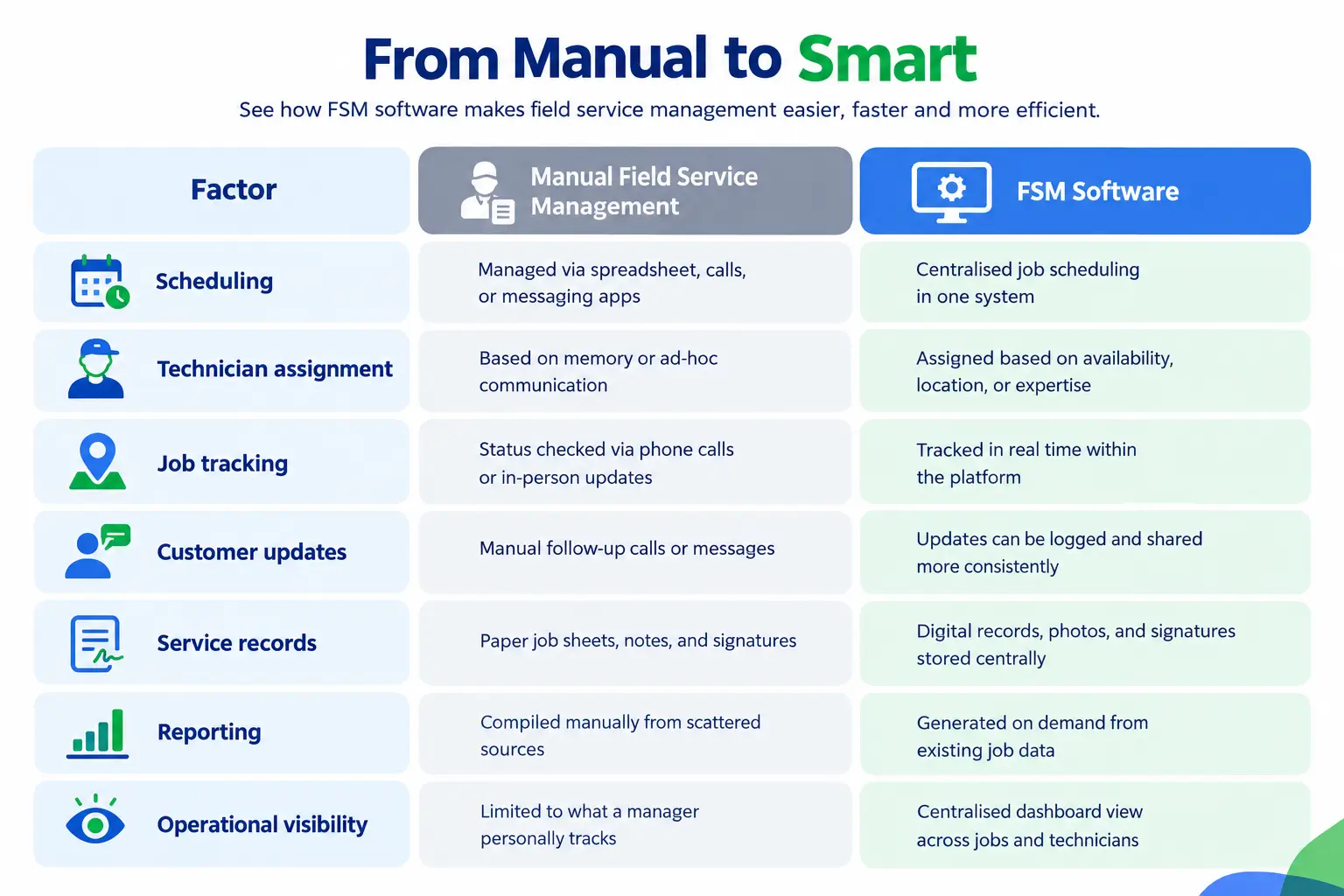
Manual Field Service Management vs FSM Software
How FSM Software Improves Field Service Operations
FSM software addresses these challenges by giving each part of the service workflow a proper digital home, rather than relying on fragmented tools:
- Scheduling becomes centralised — jobs are created, assigned, and adjusted within one system, reducing the chance of double-booking or overlooked requests.
- Technician assignment can be based on actual availability, location, or skill set, rather than whoever happens to answer the phone first.
- Job tracking happens in real time, since technicians can update job status directly from the field rather than waiting to report back at the office.
- Service request management keeps incoming requests organised in one place, rather than scattered across calls, emails, and messages.
- Customer communication improves because job status and history are accessible in one system, making it easier to answer a customer’s question without digging through old messages.
- Field reporting — job photos, notes, customer signatures — is captured digitally at the point of service, rather than relying on paper forms that need to be manually transcribed later.
- Operational visibility improves overall, since managers can see job status, technician activity, and completion rates from a single dashboard rather than compiling updates manually.
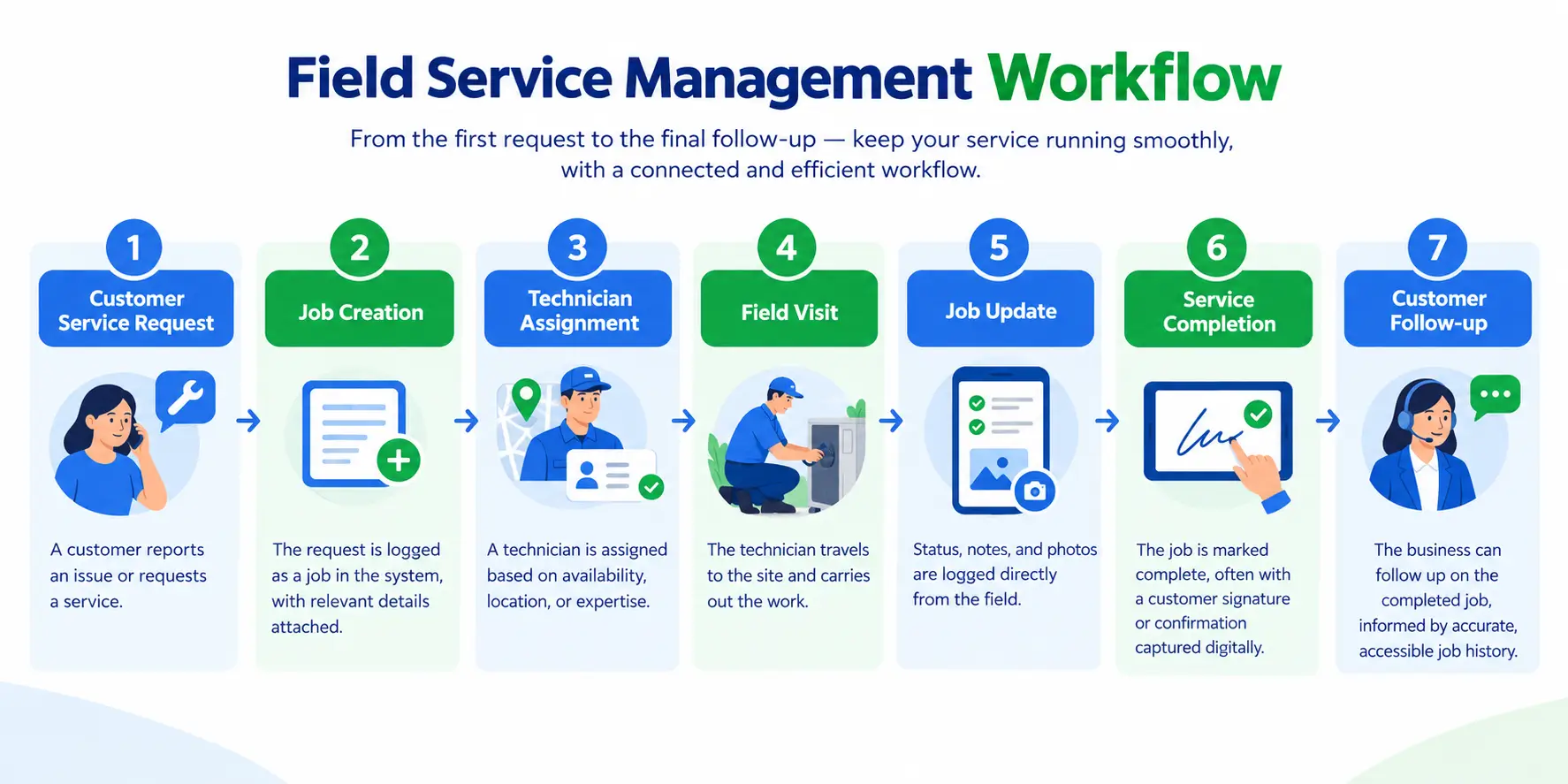
From Service Request to Job Completion
FSM Software and ERP Integration
Field service doesn’t happen in isolation — a completed job usually needs to connect to customer records, and often to inventory (if parts were used) and invoicing (to bill the customer). When FSM software operates as a standalone tool disconnected from these processes, someone still needs to manually transfer job details into the customer system, update inventory counts, or create an invoice after the fact.
Integrating field service with broader ERP processes means job data can flow more directly into related business functions — for example, a completed job’s customer and service details connecting to a centralised customer and sales management system, or parts used during a job reflecting in an inventory and warehouse management system rather than requiring manual stock adjustments afterward. The exact level of integration varies by provider and setup, so it’s worth confirming with any vendor specifically which systems their FSM software connects to and how that data flows in practice.
How to Choose FSM Software in Singapore
A structured evaluation process helps avoid choosing based on the flashiest demo rather than genuine fit for your operations:
- Map your current field service pain points first. Is scheduling the main issue, or is it more about tracking job status and reporting? This shapes which features matter most.
- Confirm mobile functionality works for your technicians. Test how technicians actually update job status, capture photos, or record notes from the field — not just how the desktop dashboard looks.
- Check integration with your existing systems. If you already use inventory, invoicing, or customer management software, confirm the FSM system can connect with it, or ask specifically how data would otherwise need to be transferred manually.
- Ask about job volume and team size limits. Some pricing tiers cap the number of jobs per month or backend users — make sure the plan fits your actual operation, not just your current size.
- Evaluate reporting capabilities. Confirm you can generate the specific reports you need — job completion rates, technician performance, service history — without extra manual work.
- Consider industry fit. Some FSM platforms are built with specific industries in mind (construction, maintenance, cleaning, IT services); check whether the vendor has experience with businesses like yours.
- Ask about support and onboarding. Since this affects daily field operations, responsive local support matters, particularly during the initial rollout.
- Check for local grant eligibility. Some FSM solutions in Singapore are pre-approved under government schemes like the Productivity Solutions Grant (PSG), which can offset some of the cost for eligible SMEs — worth confirming directly with the vendor and Enterprise Singapore.
Frequently Asked Questions (FAQs)
- What’s the difference between FSM software and a scheduling app? A basic scheduling app typically just manages appointments and calendars. FSM software goes further — it manages the full service workflow, including job creation, technician assignment based on location or skill, real-time field updates, service records, and reporting, often with the ability to connect to broader business systems like customer records or inventory.
- Is FSM software suitable for small service businesses? Yes. FSM software can help SMEs centralise job scheduling, technician coordination, service updates, and reporting. The right solution depends on the business’s team size, job volume, and operational needs.
- Can technicians use FSM software from the field? Peppol is an international standard used to exchange business documents, including invoices, in a structured digital format. InvoiceNow is Singapore’s implementation of this network.
- Can SMEs use InvoiceNow? Yes. In fact, SMEs are often where InvoiceNow makes the biggest practical difference, since manual invoicing tends to consume a disproportionate amount of a small finance team’s time.
Conclusion
Field service operations tend to break down in predictable ways when managed manually — scheduling conflicts, delayed updates, and service records that are hard to track or turn into accurate reports. FSM software addresses these problems by centralising the entire workflow, from the initial service request through to job completion and follow-up, giving both managers and technicians a shared, real-time view of what’s happening in the field.
For Singapore businesses evaluating their options, Adaptive BizApp’s Field Service Management (FSM) solution offers job scheduling, technician assignment, real-time job tracking, mobile field updates with photo and signature capture, and reporting — all from a centralised dashboard, with the option to connect to broader ERP processes like customer and sales management and inventory and warehouse management. Whichever platform a business chooses, the underlying goal is the same: replacing scattered spreadsheets and messaging threads with a single, reliable system for managing field operations.