ERP Automation for Singapore SMEs: Processes You Can Automate Today
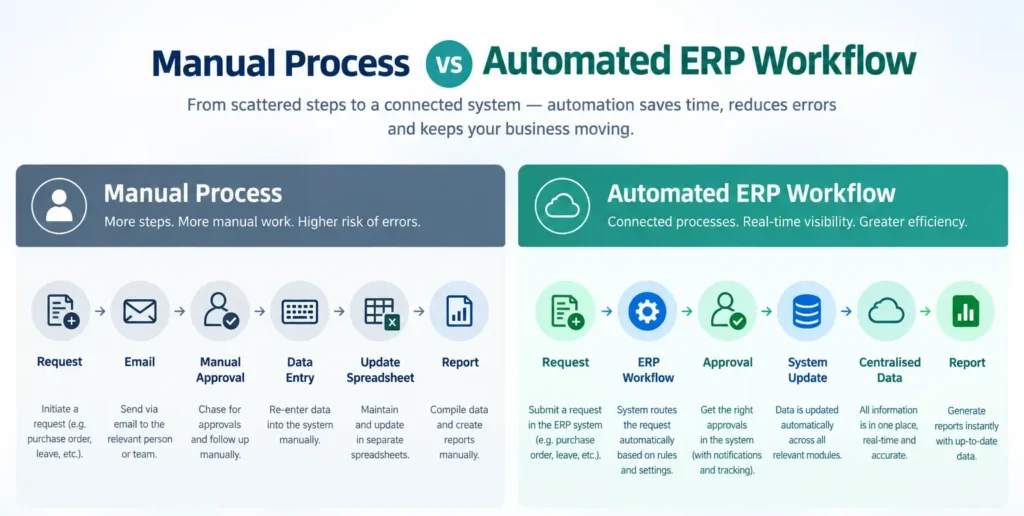
If your team spends more time re-entering the same data into three different spreadsheets than actually acting on it, you’re not alone. A lot of Singapore SMEs run on a patchwork of manual steps — emailed approvals, separate systems for sales and inventory, invoices typed up by hand — that quietly eat into the working day. ERP automation is about closing those gaps: connecting the processes that already exist in your business so information flows between them without someone having to copy it over manually.
This guide walks through what ERP automation actually means, which processes SMEs commonly automate, and how to approach implementation without overcomplicating things.
What Is ERP Automation?
ERP automation refers to using an Enterprise Resource Planning (ERP) system to carry out routine, rule-based steps in a business process automatically, instead of requiring someone to manually repeat them each time. Think of it as removing the repetitive, predictable parts of a workflow — updating a record, routing an approval, generating a document — so people can focus on the parts of their job that actually need judgement.
It’s worth being precise about what this does and doesn’t mean:
- Automation is rule-based. A sales order is created, and the system automatically updates the relevant stock record — the same thing happens the same way, every time, based on a defined rule.
- Manual processes rely on a person to notice something needs doing and carry it out themselves, whether that’s updating a spreadsheet, sending a follow-up email, or manually calculating a total.
- AI is a different category. AI-driven tools typically involve some form of prediction, pattern recognition, or decision-making under uncertainty — for example, forecasting demand based on historical trends. Not every automated ERP workflow uses AI, and it’s misleading to describe simple rule-based automation (like “update stock when an order is placed”) as artificial intelligence. Most of what this article covers is standard ERP automation, not AI.
Being clear on this distinction matters, because it sets realistic expectations. ERP automation is about consistency and efficiency in known, repeatable processes — not about a system making judgement calls on your behalf.
Why ERP Automation Matters for Singapore SMEs
For growing SMEs, the cost of manual processes tends to show up in a few consistent ways:
- Repetitive administrative work — staff spending hours on tasks like re-typing order details, manually generating invoices, or updating multiple spreadsheets with the same information.
- Data duplication — the same customer, product, or supplier information entered separately into different systems, with no guarantee they stay consistent.
- Manual errors — typos, missed updates, or miscalculations that creep in whenever a human has to transcribe data by hand.
- Delayed approvals — purchase requests or sales orders sitting in an inbox waiting for someone to notice and act on them.
- Lack of visibility — management not having a real-time view of what’s happening across sales, inventory, or finance because the data lives in disconnected spreadsheets.
- Disconnected systems — separate tools for accounting, inventory, and sales that don’t talk to each other, requiring manual reconciliation between them.
None of these problems are dramatic on their own, but they compound as a business grows — more orders, more staff, more products, and more room for small inconsistencies to become real operational friction.
Business Processes You Can Automate With ERP
Sales Processes
Common areas SMEs automate within sales workflows include:
- Sales order workflows — capturing an order once and having it flow through the necessary steps (stock check, invoicing, fulfilment tracking) without manual re-entry at each stage.
- Customer records — maintaining a single, centralised customer database rather than separate contact lists across sales, support, and finance.
- Order processing — moving an order from creation to confirmation with consistent, system-driven steps rather than ad hoc handling by whoever picks it up.
Purchase Processes
On the procurement side, ERP systems commonly support:
- Purchase requests — staff submitting requests digitally rather than via email or verbal requests that are easy to lose track of.
- Purchase orders — converting an approved request into a formal purchase order without re-typing the same details.
- Approval workflows — routing purchase requests to the right approver automatically, based on configurable rules.
- Supplier records — keeping vendor information centralised, so procurement staff aren’t hunting through old emails for supplier details.
Inventory Processes
On the inventory side, automation typically covers:
- Stock updates — inventory levels updating automatically as transactions (sales, purchases, transfers) occur, rather than relying on someone to edit a spreadsheet afterwards.
- Stock movement — tracking transfers between locations or warehouse zones as part of the same system used for sales and purchasing.
- Reorder workflows, where supported — some ERP systems can flag or generate purchase orders automatically when stock falls to a defined reorder point, reducing the risk of a slow-moving item being forgotten until it runs out.
Service Management
For businesses managing field or on-site work, common automation areas include:
- Service requests — capturing job requests in a system rather than through scattered calls or messages.
- Job assignments — allocating technicians or team members to a job through the system, rather than manual scheduling on a whiteboard or spreadsheet.
- Status updates — tracking a job’s progress (assigned, in progress, completed) in a way that’s visible to relevant staff without needing a status-check phone call.
- Service records — keeping a centralised history of past jobs per customer or site, useful for repeat service work or warranty tracking.
Reporting and Business Insights
When sales, purchasing, inventory, and finance data all live in one connected system, generating a report becomes a matter of pulling from existing, up-to-date records rather than manually compiling numbers from several separate spreadsheets each time. This doesn’t eliminate the need for someone to interpret the data — but it significantly reduces the manual labour of assembling it in the first place.
Finance / Accounting Processes
ERP systems commonly connect finance workflows to the rest of the business — for instance, generating an invoice directly from a confirmed sales order rather than a separate manual step, or reflecting purchase and sales transactions in financial records without a separate re-entry process. This kind of integration can reduce the amount of manual reconciliation between departments and support more consistent, up-to-date financial data. We won’t make specific claims here about tax compliance, statutory filing, or accounting accuracy — those depend on how a system is configured and should be confirmed directly with your finance team or accountant, and with the vendor for your specific setup.
Benefits of ERP Automation
When implemented well, ERP automation tends to deliver benefits in these areas:
- Reduced repetitive work — less time spent on manual data entry and re-entry across systems.
- Better consistency — the same process happens the same way each time, reducing variation caused by different staff handling things differently.
- Faster workflows — approvals and updates that route automatically tend to move faster than ones waiting on someone to notice and act.
- Improved visibility — centralised, real-time data gives management a clearer picture of what’s actually happening across the business.
- Better coordination — teams working from the same system are less likely to act on outdated or conflicting information.
- Scalability — automated, structured processes are generally easier to scale as order volume or headcount grows, compared to manual processes that get harder to manage as they multiply.
We’re deliberately not attaching a specific productivity percentage or time-saved figure here — the actual impact varies significantly based on how a business currently operates, how well the system is configured, and how consistently staff use it. Be cautious of any vendor (including us) that promises a precise efficiency number without knowing your specific processes.
What Should SMEs Automate First?
Not every process needs to be automated at once, and trying to do everything simultaneously often creates more disruption than benefit. A practical way to prioritise:
- Start with the most repetitive, highest-volume process. If your team processes dozens of sales orders a week manually, that’s likely to deliver more noticeable benefit than automating a task done twice a month.
- Target processes with the most error-prone manual steps. Areas where typos or missed updates cause real downstream problems (like inventory mismatches or invoicing errors) are strong early candidates.
- Look at where approvals cause the most delay. If purchase requests routinely sit unactioned for days, an automated approval workflow can have an outsized impact on operational speed.
- Consider what’s blocking visibility for management. If leadership can’t get an accurate, current picture of sales or stock without asking someone to compile numbers, that’s a sign the underlying data process needs attention.
- Weigh implementation complexity against impact. A process that’s high-impact but simple to automate is usually a better starting point than one that’s high-impact but requires significant workflow redesign.
Frequently Asked Questions (FAQs)
- Is ERP automation the same as artificial intelligence? No. ERP automation follows predefined rules, while AI can analyse data, make predictions, and support decision-making.
- Will ERP automation replace staff?Generally, automation reduces repetitive manual tasks rather than replacing roles that require judgement, oversight, or customer interaction.
- Is ERP automation suitable for SMEs? Yes. SMEs can start by automating a few high-impact processes, such as purchase approvals or sales order processing, and expand gradually.
- Can ERP automation reduce errors? Yes. Automation reduces manual data entry and repetitive steps, helping minimise errors. However, accuracy still depends on proper system setup and processes.
Conclusion
ERP automation isn’t about replacing judgement with software — it’s about removing the repetitive, rule-based steps that quietly slow a growing business down. Whether it’s routing a purchase approval, updating stock automatically when a sale is made, or generating an invoice directly from a confirmed order, the goal is the same: less manual re-entry, more consistency, and clearer visibility across the business.
For Singapore SMEs weighing where to start, the most effective approach is usually to identify one or two genuinely repetitive processes and automate those well, rather than attempting a full overhaul at once. Adaptive BizApp’s ERP platform connects Customer & Sales Management, Vendor & Purchase Management, Inventory & Warehouse Management, and Service Management within a single system, so automated workflows in one area stay connected to the rest of your operations.
Book a free demo to see how it could fit your business.